
Before AI, a Website Took Six People. After AI, It Takes One.
Written By: Shane Clark on May 17, 2026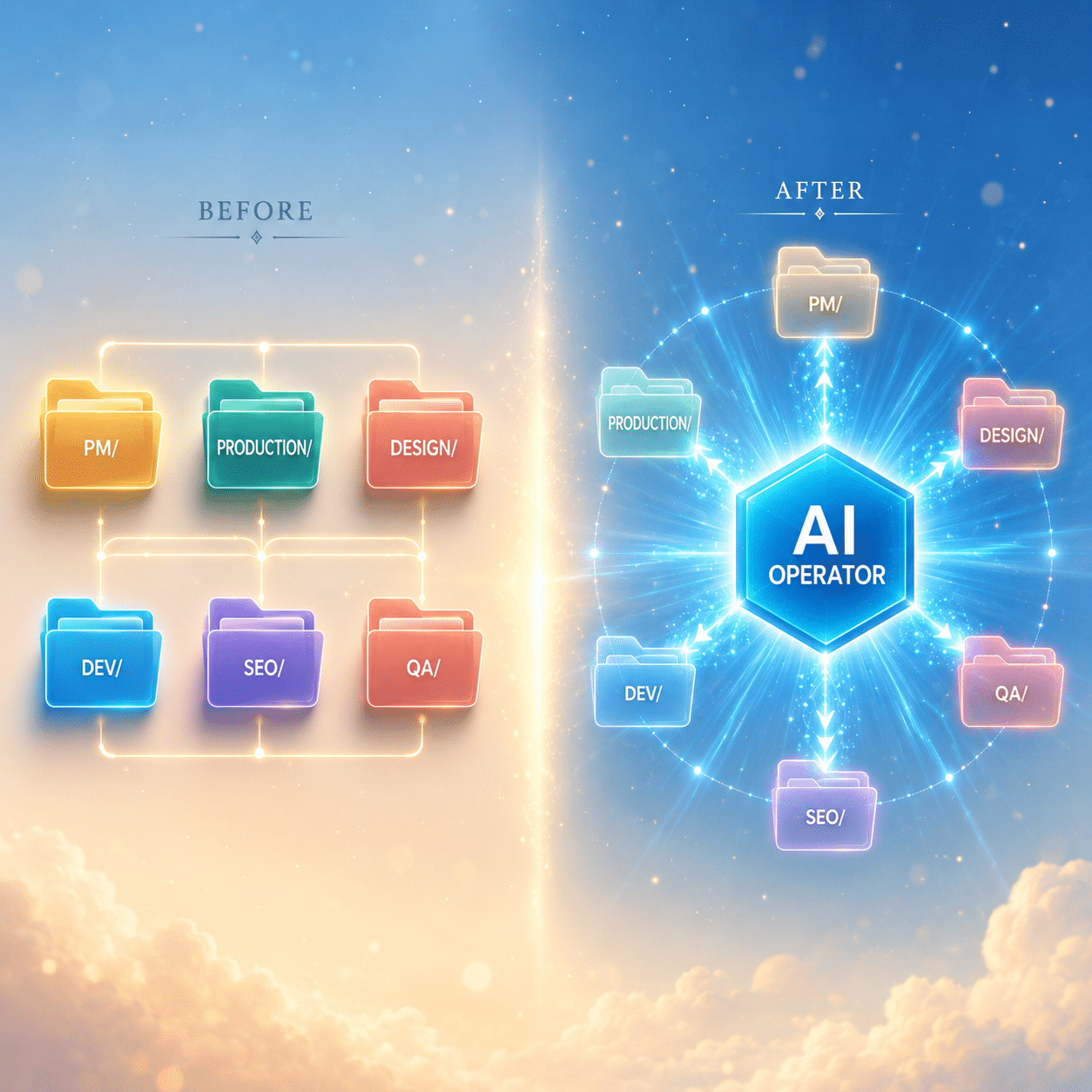
What is the AI operator role?
The AI operator role is one person doing what previously took six specialists: developer, designer, QA engineer, content writer, SEO analyst, and project manager. AI handles the production work. The operator handles the two tasks AI cannot: catching what is wrong and communicating clearly with the client.
There’s a role that didn’t really exist two years ago. It’s exploding now, and most of the folks doing it have no clean title for what they actually do.
Call it the AI Operator. Or the Cloud Operator. Or whatever name catches on. It’s the person who runs AI tools to deliver work for a paying client. Not the developer. Not the engineer. The intermediary. The one who knows enough to point Claude at the right problem, review what it ships, fix what’s broken, and tell the client when something’s running late. This shift is part of a bigger pattern I’ve written about before: the move from outsourcing to insourcing, powered by AI.
The job description that didn’t exist 18 months ago
AI Operators come from everywhere. Some are virtual assistants who picked up AI tools last year and never looked back. Others are former agency staff who got laid off and decided to go solo. A few are total beginners who watched a YouTube video and now charge $2,000 for a website.
The market for this role keeps growing. As AI tooling improves, the supply side of “doing the actual work” gets cheaper and faster. Meanwhile, what stays expensive is the human who can manage the AI on someone else’s behalf, catch the things it gets wrong, and explain what’s happening to a paying client. That’s a real job. We just don’t have a clean name for it yet.
The rest of this post is about the skills that job needs, what AI handles for you, and where you’re still on your own. If you’re already doing this work, you’ll recognize the gaps. If you’re thinking about getting into it, you’ll see what to study first.
Before AI, a website took six specialists
A standard website project two years ago looked like this on the production side:
- A project manager kept the timeline honest and ran client conversations.
- A production manager juggled deliverables across the team and made sure handoffs happened on schedule.
- A designer built the visual system, made mockups, picked typography.
- A developer turned the mockups into code, integrated APIs, deployed to a server.
- An SEO person did keyword research, wrote meta descriptions, set up schema markup.
- A QA person clicked through the finished site looking for what didn’t work.
Six people. Sometimes more. Each one specialized, with their own queue and their own deliverables. Each one expensive.
A respectable agency website took 4 to 8 weeks and cost between $15K and $50K, mostly because the six humans needed to get paid for their time. This was the math. It worked for a long time. Some agencies are still running it.
But after AI, the math changes. This is part of a broader trend I covered in the end of task work and how AI is replacing jobs. The roles don’t disappear; they collapse into one person who has to know all of them at a junior-to-mid level.
After AI, the same website ships with one person
One person, six hats, and an AI sitting at every layer.
The project manager hat? It’s the operator running the client conversations and watching the calendar. AI drafts the status emails. The production manager hat? Same operator, with AI handling file storage, version control, and handoff checklists.
What about design? The operator picks the direction. AI generates mockups, alt text, brand variants. Development? Claude Code or Cursor or Copilot writes the actual code while the operator specs requirements and reviews the diffs. SEO? AI runs keyword research, drafts meta titles inside character limits, generates schema markup. The operator picks targets and approves copy.
Then there’s QA. The operator clicks through the site looking for what’s wrong. AI doesn’t really help here, which we’ll come back to in a minute.
That same 4-to-8-week, $15K-to-$50K website now takes a single operator about 1 to 3 weeks and ships for $2K to $8K. The economics are different. Some agencies are dying because they can’t compete. Meanwhile, some operators are thriving because the AI does in minutes what used to take a junior designer all afternoon.
But the operator carries all six hats. That’s the catch.
Where AI carries most of the weight
Four of the six roles map cleanly to heavy AI augmentation.
First, project management. AI drafts client emails, summarizes calls, builds timelines, and reminds you to follow up. You still run the human conversations, but the busy work is handled.
Second, production. AI manages handoffs, keeps version histories straight, generates checklists. Your inbox is less of a mess because half of it is now automated. Third, design. AI generates mockups in seconds. It picks color palettes that pass contrast checks. It writes alt text. You still art-direct, but you don’t have to be a designer to ship designs that look professional.
Fourth, development. This is where AI really shines. Claude, Cursor, Copilot, and the rest of them can write production-quality code from a spec. The operator reviews and tests. Importantly, the skill becomes “knowing what to ask for,” not “writing every line yourself.” If you’re new to setting up Claude for production work, start with how to create a Claude.md file; it’s the single best multiplier for any AI Operator who works with Claude.
Fifth, SEO. AI handles keyword research, drafts meta titles inside Yoast‘s character limits, writes schema markup, generates internal link suggestions. The operator still picks targets and reviews copy for brand fit.
That’s roughly 50 to 80 percent of the labor handled by AI, depending on the role. For most projects, that’s enough to ship in a quarter of the time at a quarter of the cost. Pretty good return if you can manage the rest.
Where AI leaves you hanging
Two roles don’t compress well. QA and client communication.
For QA, the AI did the work. So the AI is exactly the worst person to check it. Code review reads the diff. It doesn’t read the experience. AI doesn’t know what your dropdown looks like at 2,000 records, or whether your KPI tile count actually matches the list below it.
For communication, the AI can write a message. However, it can’t decide when to send it, what to leave out, or how worried the client should be about something. The operator has to make those calls. Importantly, they’re the calls that decide whether the client stays or leaves.
These two roles together are about 20 to 30 percent of the work in time. But they’re 80 percent of the difference between a great operator and a contractor who never gets booked again. Get them right and you keep clients for years. Get them wrong and clients quietly drift away.
Most operators are weak at both. Not because they’re bad, but because nobody has trained them. The skills aren’t in a YouTube tutorial. They’re in the gut feeling of someone who’s done it for ten years. So here’s the question: how do you get the gut feeling without spending ten years?
Why QA is the hardest hat to wear alone
Because AI doesn’t catch its own bugs.
Some types of bugs the AI gets right almost always. Security holes. Broken syntax. Obvious logic errors. The boring stuff. The stuff CI catches before anyone notices.
However, the AI ships subtler stuff too. Inconsistent padding across screens. A KPI count that says 12 while the list below shows 31. Then there’s the dropdown that works at 12 items and dies at 2,000. Forms that validate client-side but accept garbage server-side. An em-dash where the brand rule says no em-dashes. Buttons that do nothing visible when clicked. Tooltips that describe features that no longer exist. None of these get caught by code review, because code review reads the diff, not the experience.
These bugs get caught by humans actually using the product. The AI Operator is the human who has to find them, before the client does.
Eleven categories of subtle bugs
From years of building and shipping WordPress plugins, I’ve narrowed the patterns down to 11 categories of subtle bugs AI tends to ship: UI (visual), UX (interaction), data integrity, relational database, logic, performance, accessibility, content, user engagement, scalability, and a small “other” bucket for cross-category weirdness.
Specifically, if you can scan a screen and identify which of the 11 you’re looking at, you catch most of what AI ships. If you can’t, you ship it to your client and find out from a support ticket. Notably, QA is a learnable skill. But it’s not a skill the AI can hand you. You have to build it yourself, the same way a developer builds it: by seeing the same bug patterns ten or twenty times and learning to recognize them on sight.
Why client communication is the second hardest hat
Because most operators only send updates after the work is done. That’s the wrong time.
Clients don’t measure you by deliverables alone. They measure you by how surprised they are by them. For instance, a delivered project they expected late feels great. A delivered project they expected early but slightly late feels bad. Same deliverable, opposite reaction. The difference is the communication leading up to it.
Here’s the principle worth tattooing on your forearm: the time to give an update is not when you’re finished. It’s continuously. To set and reset expectations BEFORE the client has to ask.
This is what AI can’t do for you. AI can write a status email. However, it can’t know that you should send one tomorrow because the client mentioned a board meeting on Friday. AI can draft a message about a delay. But it can’t decide whether you should call instead of email because the relationship is already shaky.
What does the cadence look like for a healthy operator-client relationship? Roughly: a short status note every 2 to 4 days during active work, an immediate ping when anything material happens (good or bad), and a delivery message that doesn’t make the client ask “is it done yet?”
Most operators don’t do this. They go silent for a week, get a panicked email from the client, and write back with a five-paragraph apology. Then they wonder why they don’t get repeat business. Fortunately, this is fixable. But you have to know it’s the problem first.
How to train both hats before a client catches you
There’s a course in the works for exactly this gap. It’s called SWG What’s Wrong: AI Operator Foundations. The premise is simple: train the two hats AI can’t wear for you.
Twelve modules. Modules 1 through 11 cover the 11 categories of subtle bugs AI ships, with lessons, drills, and exam questions for each one. Module 12 covers client communication: setting expectations, the update cadence, how to message about bugs and breakage, how to close the loop on delivery.
The capstone is a live exam. You log in, a deliberately broken WordPress feature loads, you have 90 minutes to find every bug, categorize it, and write up reports a developer could actually fix from. The system scores you against the planted bug list.
The full course isn’t open yet. Meanwhile, the field manual is. It’s a 36-page printable PDF covering all 11 bug categories with examples, checklists, and the common traps for each. Free to download. Reads in about 90 minutes.
Grab the free field manual
A 36-page printable PDF covering all 11 categories of subtle bugs AI ships. Includes the checklists I use myself on every QA pass. No email gating to start, just the download.
Here’s the bigger point. The single-operator era is here. The skills that used to be split across six specialists are now in one person’s head, augmented by AI. Four of those skill areas are mostly handled by the AI itself. Two of them, QA and client communication, are still on you. The operators who train both will be the ones running thriving practices 18 months from now. The ones who don’t will spend that time chasing churned clients and wondering what went wrong.
Pick your camp.
Frequently asked questions
 What exactly is an AI Operator?
An AI Operator is a person who uses AI tools to deliver work on behalf of paying clients. They're not the developer or engineer building the AI itself. They're the intermediary who knows how to point AI at the right problem, review what it ships, fix what's broken, and communicate with the client. The role didn't exist as a defined category two years ago. Now it's exploding as AI tools get better and the cost of producing work drops.
Do I need to be a developer to work as an AI Operator?
Not really. You need enough technical literacy to spot when something looks off, but you don't need to write code from scratch. Most operators come from project management, virtual assistant work, agency operations, or freelance design. Your needed technical depth is "can review what the AI ships," not "can build it solo." That said, basic familiarity with HTML, CSS, and how databases work helps enormously when you're reviewing AI output.
What's the biggest mistake new AI Operators make?
Going silent. Most new operators message the client at the start of a project, get heads-down on the work, then don't send another update until they're delivering. That's how relationships die. Clients don't actually measure you by deliverables alone. They measure you by how surprised they are by them. A short status note every 2 to 4 days, plus an immediate ping when anything material happens, is the cadence that keeps clients booked.
How is being an AI Operator different from being a virtual assistant?
A virtual assistant typically handles inbox, calendar, and admin work. An AI Operator delivers actual production work: websites, landing pages, content, automations, custom plugins. The skill stack is bigger and the rates are higher (typical operator rates run $50 to $150 per hour versus $20 to $40 for traditional VA work). Notably, many virtual assistants are quietly evolving into AI Operators as they pick up AI tools and start charging for production deliverables.
How much should an AI Operator charge?
It depends on the deliverable and your experience. Typical project pricing in 2026 looks like: $500 to $2,000 for landing pages, $2,000 to $8,000 for full websites, $1,500 to $5,000 per month for ongoing retainers. Hourly rates run from $50 (entry) to $150-plus (experienced and niched with case studies). Charge less than this and you're racing to the bottom. Charge more if you can defend the value with portfolio and process.
